Automation & Integrations

How to integrate Integrately with WhatsApp via Messegy?

Automate API Campaigns by connecting your favorite apps like Hubspot, SalesForce etc with Messegy by integrating Messegy with Integrately.

6 min read 22 Sections Verified Guide

Connect Integrately with WhatsApp via Messegy for 1-Click integration of multiple apps like Hubspot, Calendly etc to Messegy with ease.

Start for FREEBook a Demo
integrately-whatsapp-integration.jpg

Founders & Marketers Love us

Trusted by 210,000+ Businesses across 68+ Countries

![Skullcandy](https://d3jt6ku4g6z5l8.cloudfront.net/IMAGE/637206fccafb9d0eb4ba6428/8870923_images 1 1.png)

![Quikr](https://d3jt6ku4g6z5l8.cloudfront.net/IMAGE/637206fccafb9d0eb4ba6428/2427591_images 3 1 1.png)

PhysicsWallah
PhysicsWallah

Bajaj Finance
Bajaj Finance

![HomeLane](https://d3jt6ku4g6z5l8.cloudfront.net/IMAGE/637206fccafb9d0eb4ba6428/8075066_image001 1.png)

IndiaMart
IndiaMart

![Delhi Transport Corporation](https://d3jt6ku4g6z5l8.cloudfront.net/IMAGE/637206fccafb9d0eb4ba6428/5369728_DelhiTransportCorporation 1.png)

Emami
Emami

![Vivo](https://d3jt6ku4g6z5l8.cloudfront.net/IMAGE/637206fccafb9d0eb4ba6428/4270885_VivoLogo2009 1.png)

Hindustan Times
Hindustan Times

JustDial
JustDial

![People Matters](https://d3jt6ku4g6z5l8.cloudfront.net/IMAGE/637206fccafb9d0eb4ba6428/6588886_PeopleMatterslogo 1.png)

![Adani](https://d3jt6ku4g6z5l8.cloudfront.net/IMAGE/637206fccafb9d0eb4ba6428/4081303_Adani2012logo 1 2.png)

![Aditya Birla - Hindalco](https://d3jt6ku4g6z5l8.cloudfront.net/IMAGE/637206fccafb9d0eb4ba6428/2525711_aditya birla hindalco logo1 1.png)

![WIPRO](https://d3jt6ku4g6z5l8.cloudfront.net/IMAGE/637206fccafb9d0eb4ba6428/7372693_WiproPrimaryLogoColorRGB 1 2 1.png)

![Fortune Foods](https://d3jt6ku4g6z5l8.cloudfront.net/IMAGE/637206fccafb9d0eb4ba6428/844668_e437eb33c4409c0d1343c5257147f440376c3c78b073a2104b30bba3257b5fb4 1.png)

Clove Dental
Clove Dental

![DIGIO](https://d3jt6ku4g6z5l8.cloudfront.net/IMAGE/637206fccafb9d0eb4ba6428/2995876_digioblue 1.png)

Turtlemint
Turtlemint

Harman
Harman

![HRX by Eatfit](https://d3jt6ku4g6z5l8.cloudfront.net/IMAGE/637206fccafb9d0eb4ba6428/4972196_EatFit 1.png)

Brigade
Brigade

![The Indian Express](https://d3jt6ku4g6z5l8.cloudfront.net/IMAGE/637206fccafb9d0eb4ba6428/2026031_images 2 1.png)

Yes Madam
Yes Madam

Cargill
Cargill

PayU
PayU

Tata
Tata

Bajaj Finance
Bajaj Finance

JustDial
JustDial

![StayVista](https://d3jt6ku4g6z5l8.cloudfront.net/IMAGE/637206fccafb9d0eb4ba6428/6894864_65151a8bd469782f64b31a81StayVistaLogoWarmBlackCMYKSVWarmBlackLogo1 1 5.png)

Yakult
Yakult

![Shine.com](https://d3jt6ku4g6z5l8.cloudfront.net/IMAGE/637206fccafb9d0eb4ba6428/5857527_images 4 1.png)

Signify
Signify

![Jaro Education](https://d3jt6ku4g6z5l8.cloudfront.net/IMAGE/637206fccafb9d0eb4ba6428/4749507_x3yozluxpwkcfa5wicbf 1 2.png)

CEAT
CEAT

![The Art of Living](https://d3jt6ku4g6z5l8.cloudfront.net/IMAGE/637206fccafb9d0eb4ba6428/3421960_aolflogo1 1.png)

Ebix
Ebix

![Iskcon](https://d3jt6ku4g6z5l8.cloudfront.net/IMAGE/637206fccafb9d0eb4ba6428/4482696_iskconlogo 1.png)

Lewis Berger
Lewis Berger

![Adani](https://d3jt6ku4g6z5l8.cloudfront.net/IMAGE/637206fccafb9d0eb4ba6428/4081303_Adani2012logo 1 2.png)

![Aditya Birla - Hindalco](https://d3jt6ku4g6z5l8.cloudfront.net/IMAGE/637206fccafb9d0eb4ba6428/2525711_aditya birla hindalco logo1 1.png)

![WIPRO](https://d3jt6ku4g6z5l8.cloudfront.net/IMAGE/637206fccafb9d0eb4ba6428/7372693_WiproPrimaryLogoColorRGB 1 2 1.png)

![Tata Motors Finance](https://d3jt6ku4g6z5l8.cloudfront.net/IMAGE/637206fccafb9d0eb4ba6428/8490909_logotmf 1.png)

TP-Link
TP-Link

![Bombay Shaving Company](https://d3jt6ku4g6z5l8.cloudfront.net/IMAGE/637206fccafb9d0eb4ba6428/3681942_Frame 2.png)

Asian Paints
Asian Paints

![Yulu](https://d3jt6ku4g6z5l8.cloudfront.net/IMAGE/637206fccafb9d0eb4ba6428/7280985_images 5 1.png)

![Shobha Realty](https://d3jt6ku4g6z5l8.cloudfront.net/IMAGE/637206fccafb9d0eb4ba6428/7468207_sobharealtylogo 1.png)

ZeeLearn
ZeeLearn

India Today Group
India Today Group

Godrej
Godrej

![Angel One](https://d3jt6ku4g6z5l8.cloudfront.net/IMAGE/637206fccafb9d0eb4ba6428/2527246_3fb11a43d86c80bd5c5885ce1422111c 1.png)

Tata
Tata

Bajaj Finance
Bajaj Finance

JustDial
JustDial

WTI Cabs
WTI Cabs

![Adani](https://d3jt6ku4g6z5l8.cloudfront.net/IMAGE/637206fccafb9d0eb4ba6428/4081303_Adani2012logo 1 2.png)

![Aditya Birla - Hindalco](https://d3jt6ku4g6z5l8.cloudfront.net/IMAGE/637206fccafb9d0eb4ba6428/2525711_aditya birla hindalco logo1 1.png)

![WIPRO](https://d3jt6ku4g6z5l8.cloudfront.net/IMAGE/637206fccafb9d0eb4ba6428/7372693_WiproPrimaryLogoColorRGB 1 2 1.png)

Yes Madam
Yes Madam

TP-Link
TP-Link

Signify
Signify

CEAT
CEAT

Ebix
Ebix

Yakult
Yakult

![Adani](https://d3jt6ku4g6z5l8.cloudfront.net/IMAGE/637206fccafb9d0eb4ba6428/4081303_Adani2012logo 1 2.png)

![Aditya Birla - Hindalco](https://d3jt6ku4g6z5l8.cloudfront.net/IMAGE/637206fccafb9d0eb4ba6428/2525711_aditya birla hindalco logo1 1.png)

![WIPRO](https://d3jt6ku4g6z5l8.cloudfront.net/IMAGE/637206fccafb9d0eb4ba6428/7372693_WiproPrimaryLogoColorRGB 1 2 1.png)

Automate Notifications on WhatsApp

Connect your favourite apps (Hubspot, Calendly etc) with Messegy to automate WhatsApp API campaigns such as sign-up confirmations, event reminders, abandoned cart notifications, orders updates, application drop-off alerts, and more - all through Integrately. You can do it easily by integrating Integrately with Messegy, an official WhatsApp Business API based marketing platform.Here, we'll tell you how you can integrate Messegy with Integrately to connect Messegy with multiple apps to automate API-based campaigns on WhatsApp.

Connecting Integrately with Messegy

Step-by-Step Guide

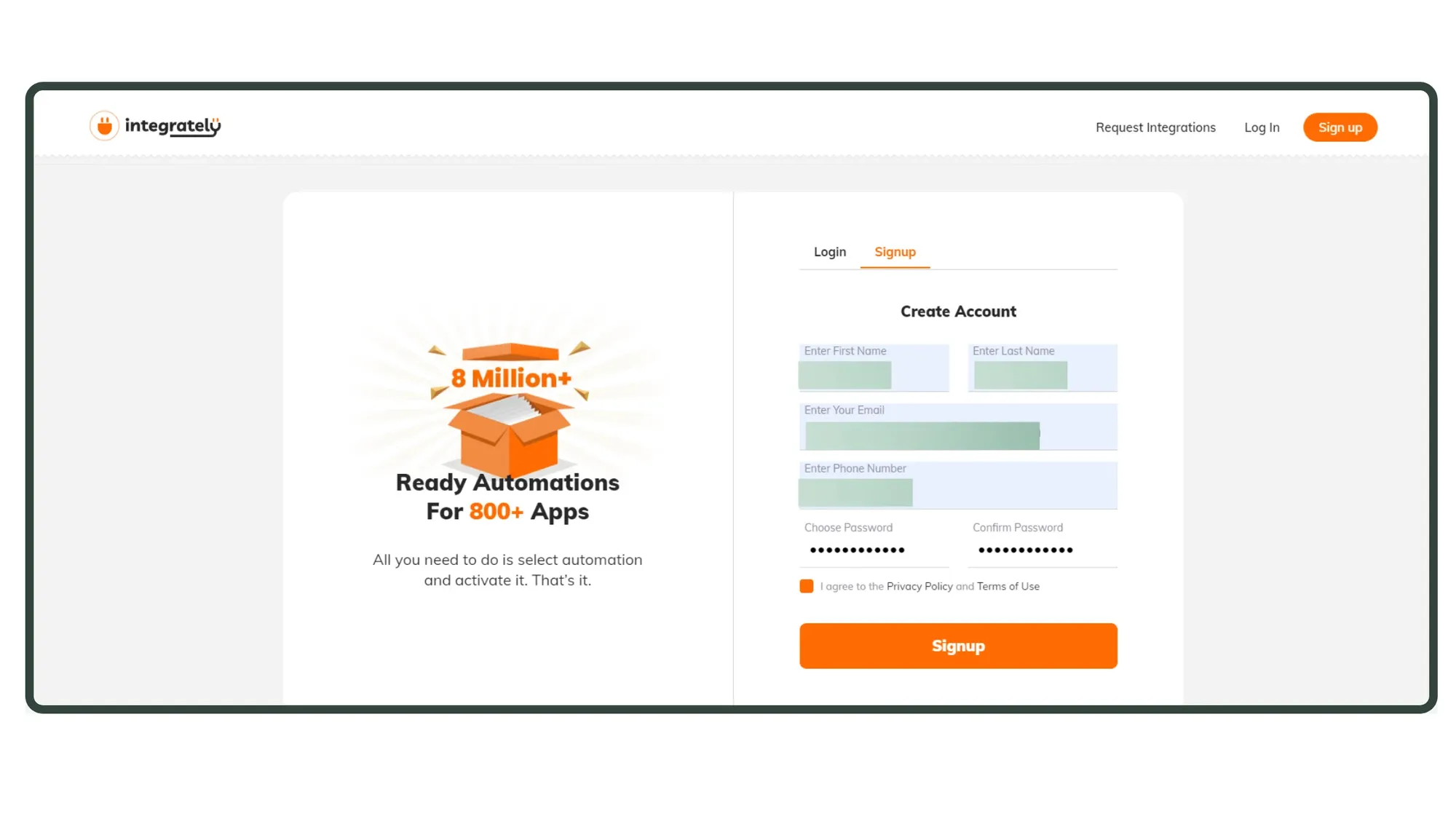
Sign Up for Integrately

Sign up for a free Integrately account. If you already have one, proceed to the next step.

Sign Up (FREE)
1. Signup to Integrately.webp

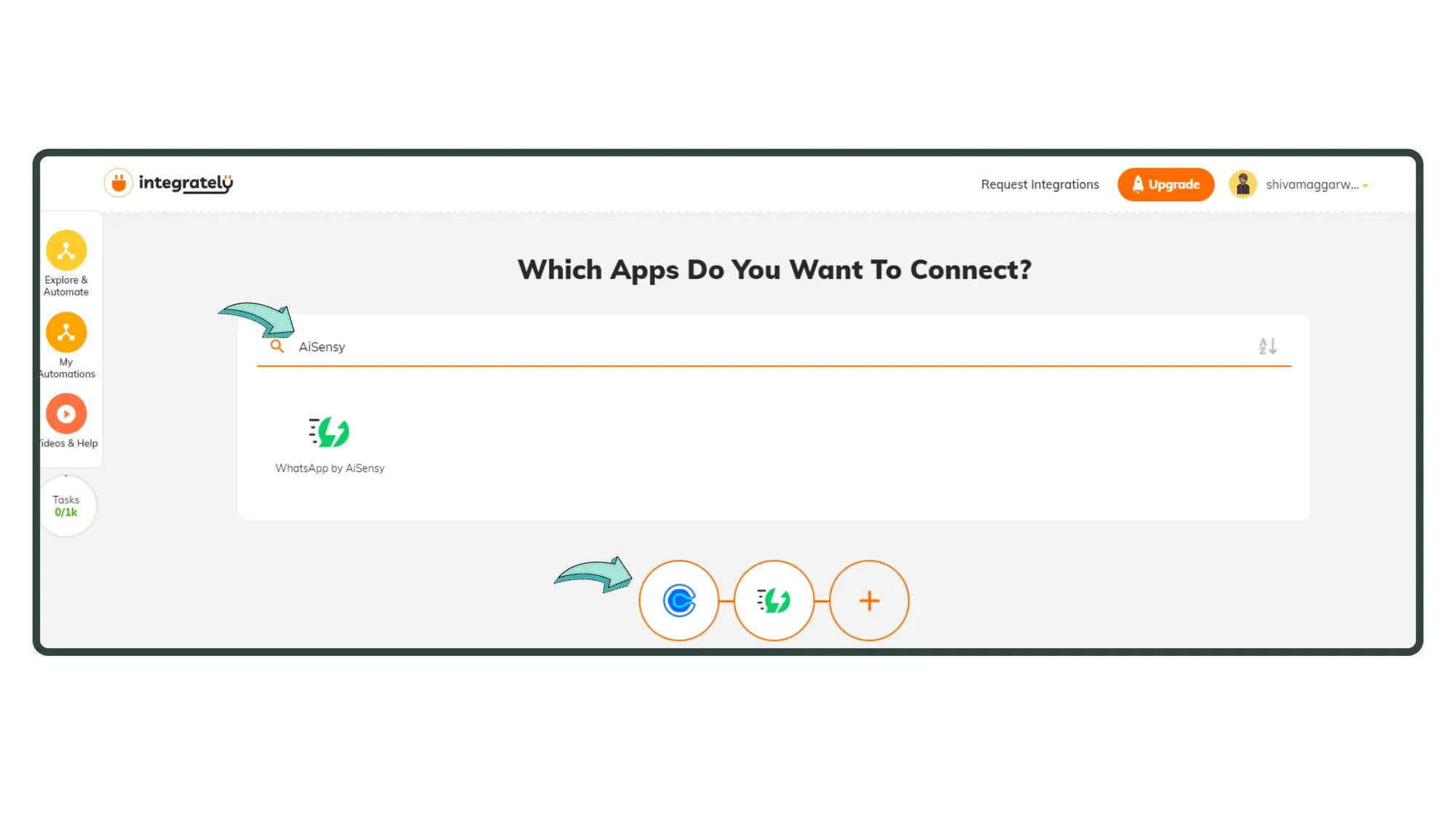
Choose Your Apps

In Integrately's Dashboard, search for the apps you want to connect. Here, we'll connect Calendly with Messegy.Tip: For Messegy, search using keywords like "WhatsApp" or "Messegy."
2. Choose Apps (1).webp

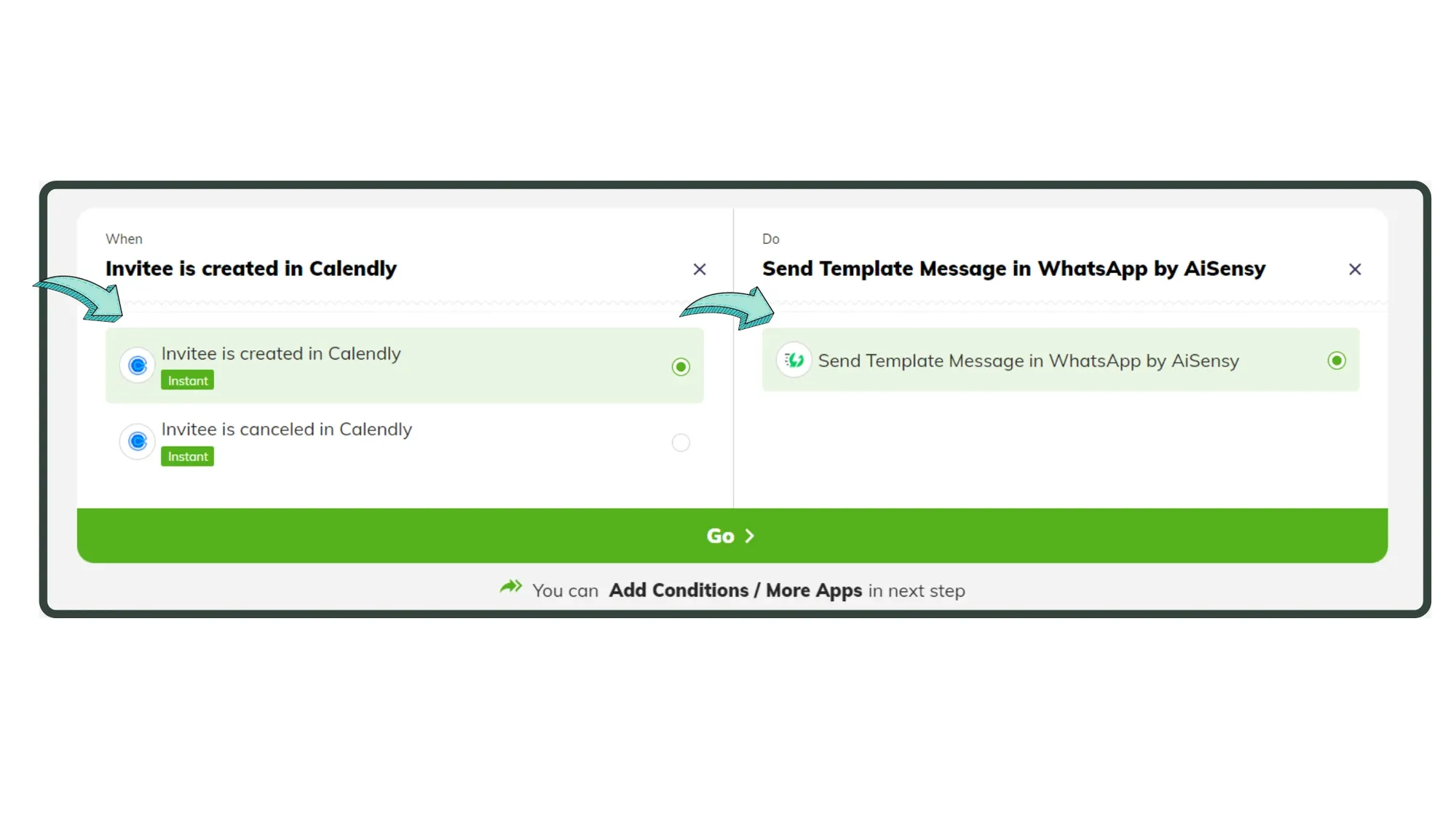
Select Triggers & Actions

Define the purpose of the connection. For example, in Calendly, select triggers like "Invitee Created" or "Invitee Canceled."Note: Only one trigger can be used per WhatsApp API campaign.A WhatsApp message will be automated to the user upon activation of the trigger. When a trigger activates, it will initiate an action via Messegy. i.e. Send a WhatsApp Template Message. After selecting the Trigger & Action, press "Go", to create your automation.
3. Choose Triggers & Actions (1).webp

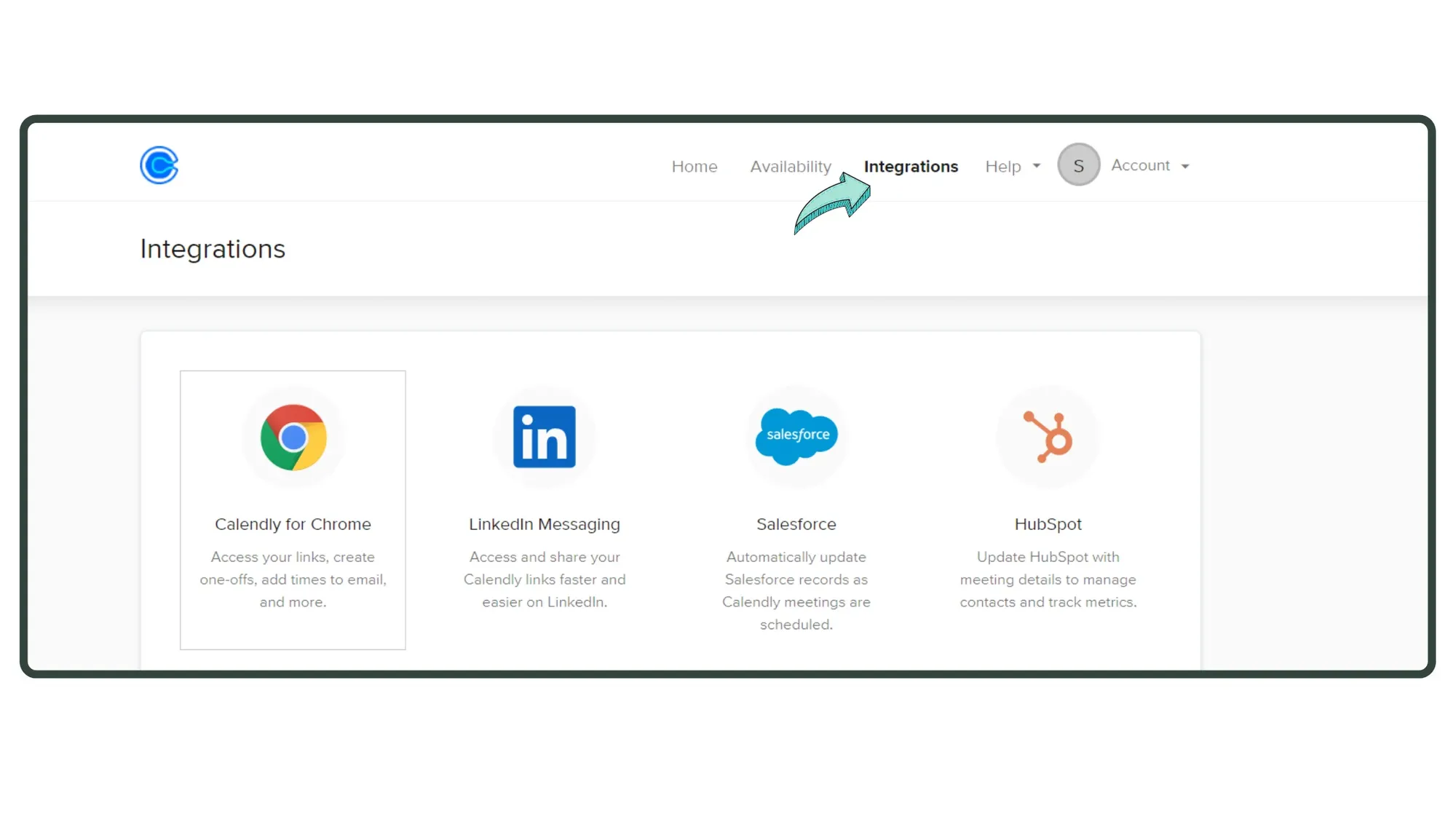
Go to Integrations in Calendly

Now, we need to copy the API Keys of both the Apps to integrate them. First, go to Calendly & reach the Integrations page. Then, scroll down & click on, "API & Webhooks".
4. Go to Integrations in Calendly.webp

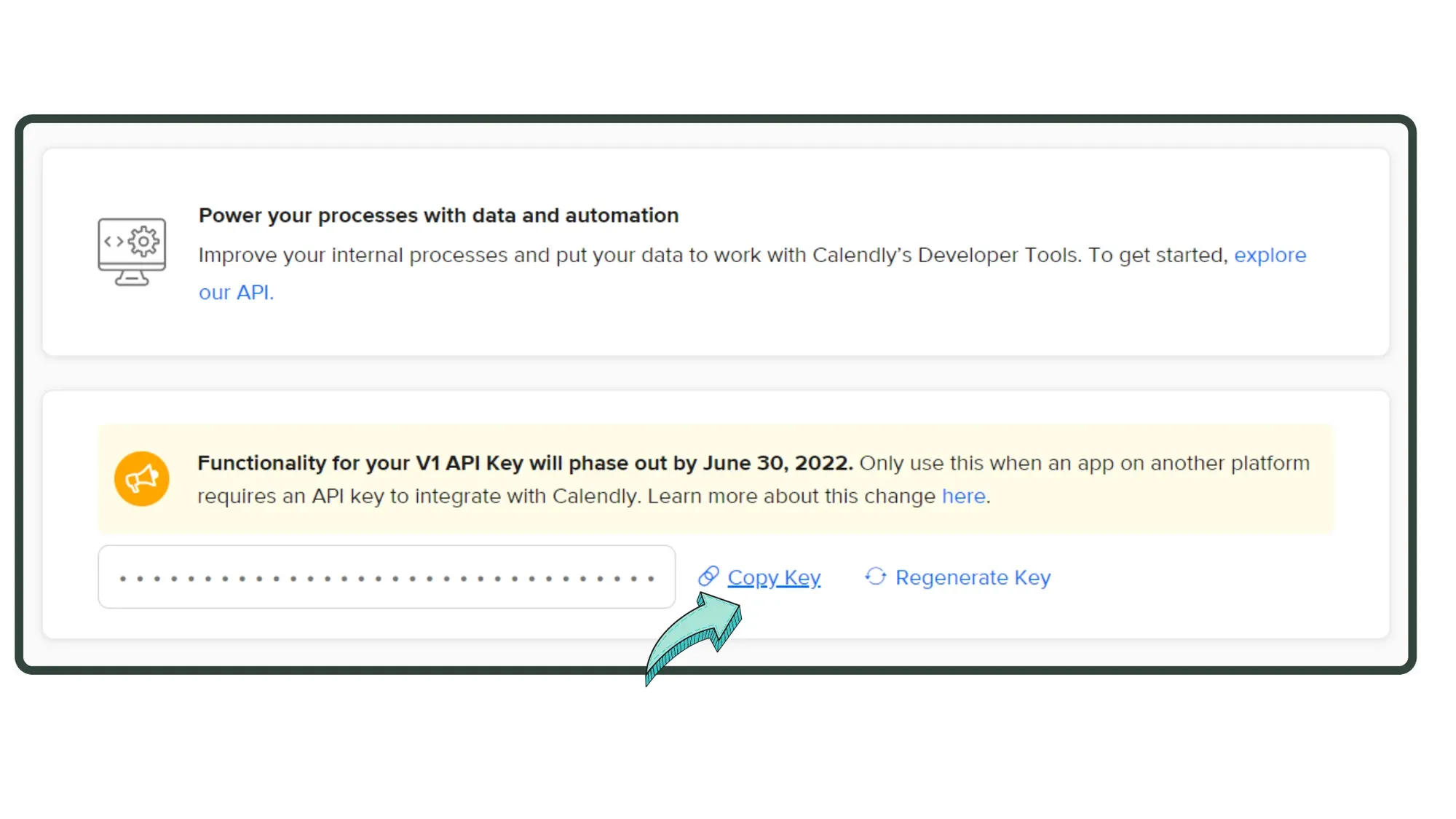
Copy Calendly's API Key

In the next screen, copy Calendly's API key.
5. Copy Calendly's API Key.webp

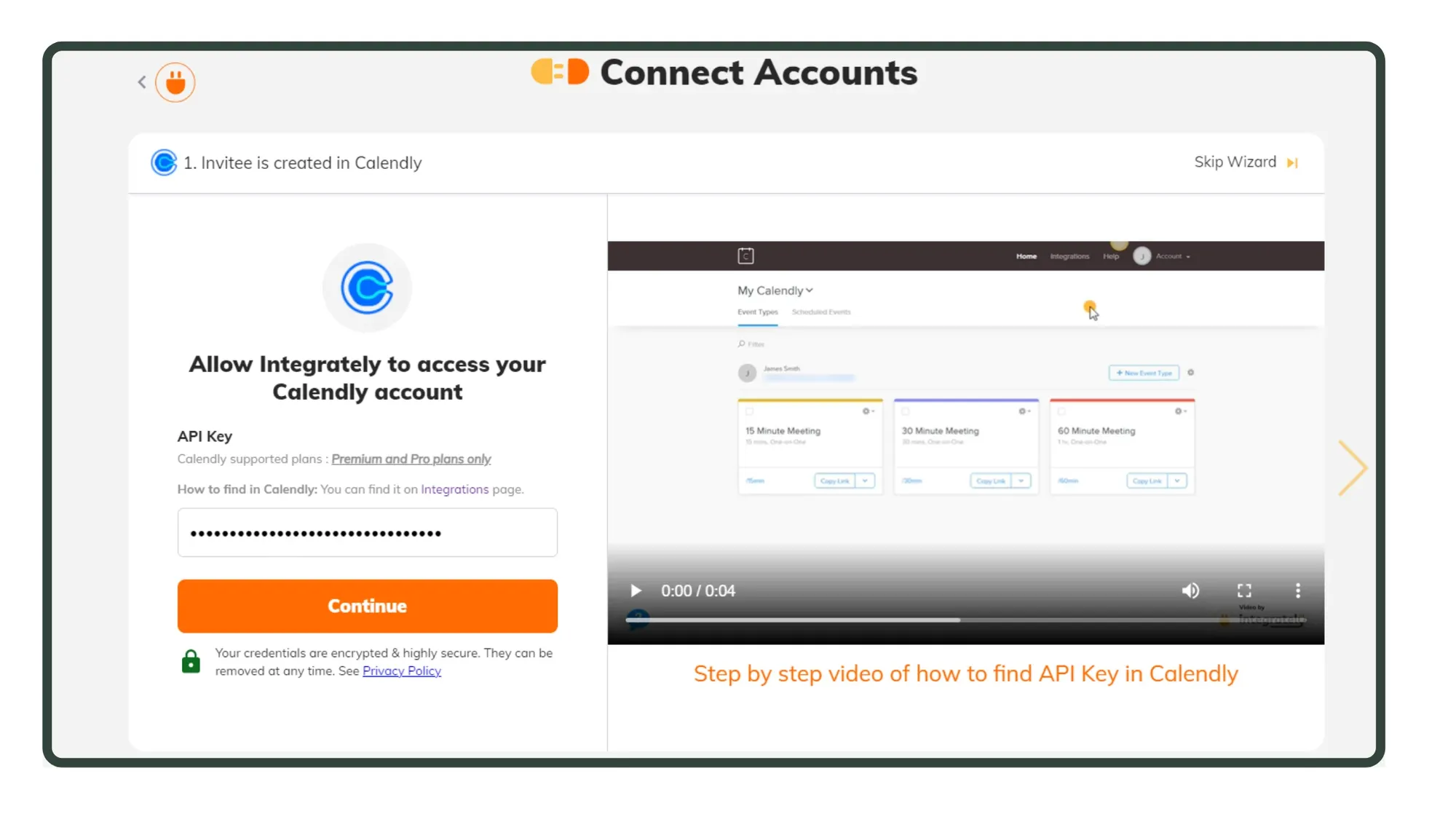
Paste the API Key in Integrately

Go to Integrately's Dashboard & paste Calendly's API Key. Click "Continue" after you paste the API key.
6. Paste API Key in Integrately.webp

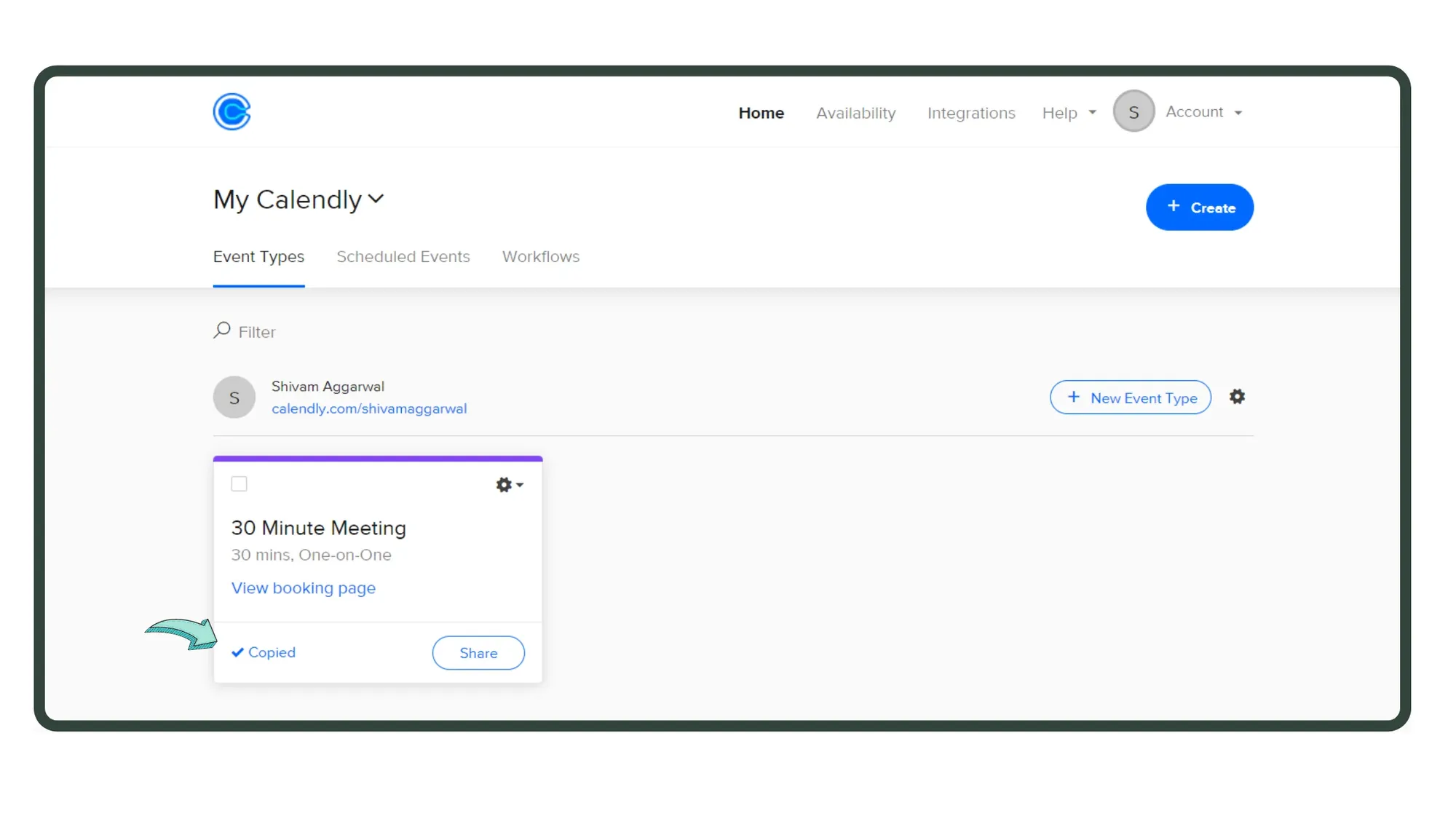
Copy Meet Key from Calendly

On the next screen, you'll be asked to send a test record in Calendly that will fire up when an "Invitee is created" (our trigger). You can also make changes to the "Meeting" like adding questions, changing meeting duration etc.In a fresh tab, open the link & schedule a test meet!
7. Copy Meet Link from Calendly.webp

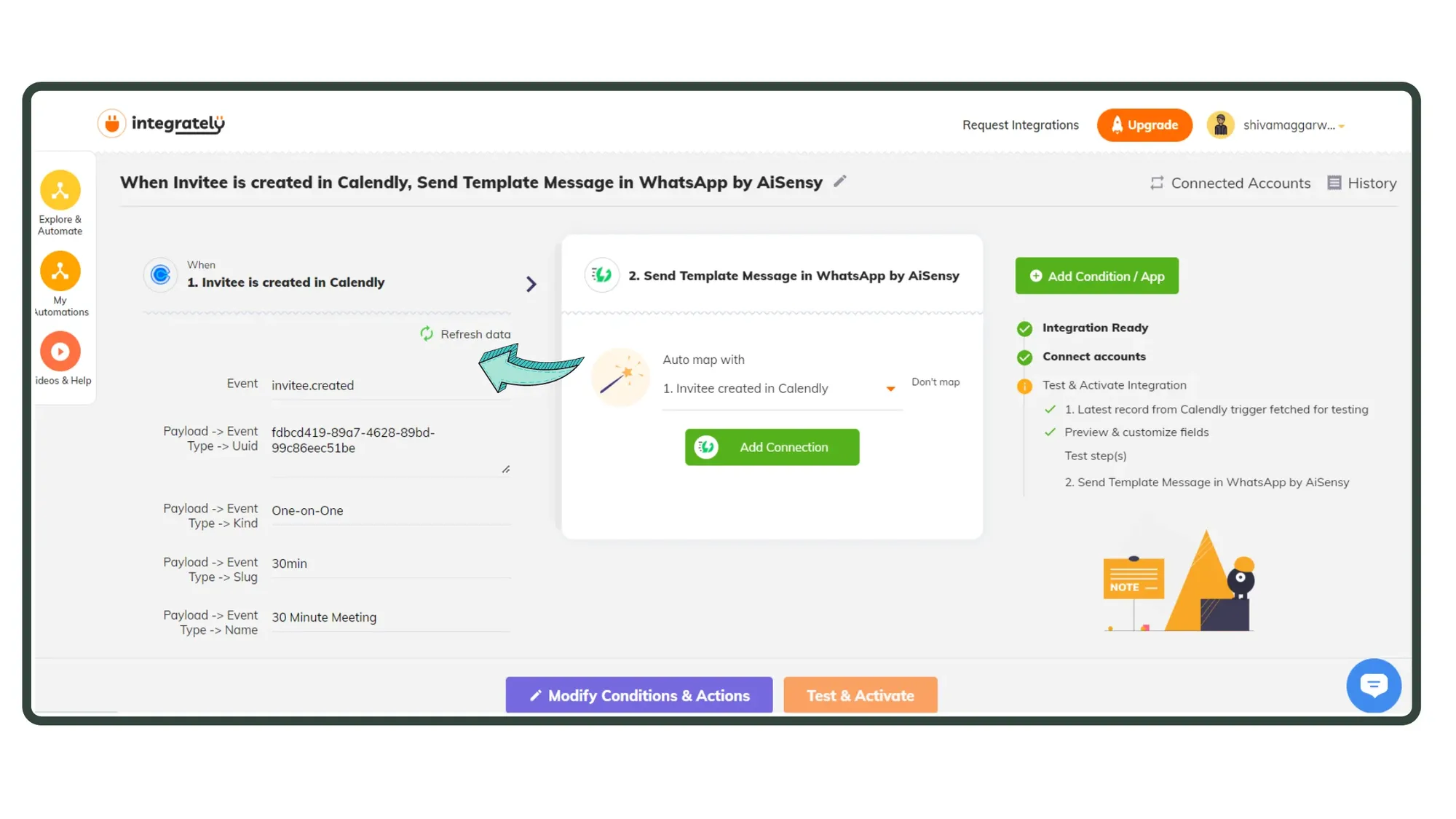
Hit "Refresh Data"

Back in Integrately, hit "Refresh Data". It will appear as shown in the image.If not, go back 👉 Schedule another meet 👉 Refresh Data.
8. Hit Refresh Data.webp

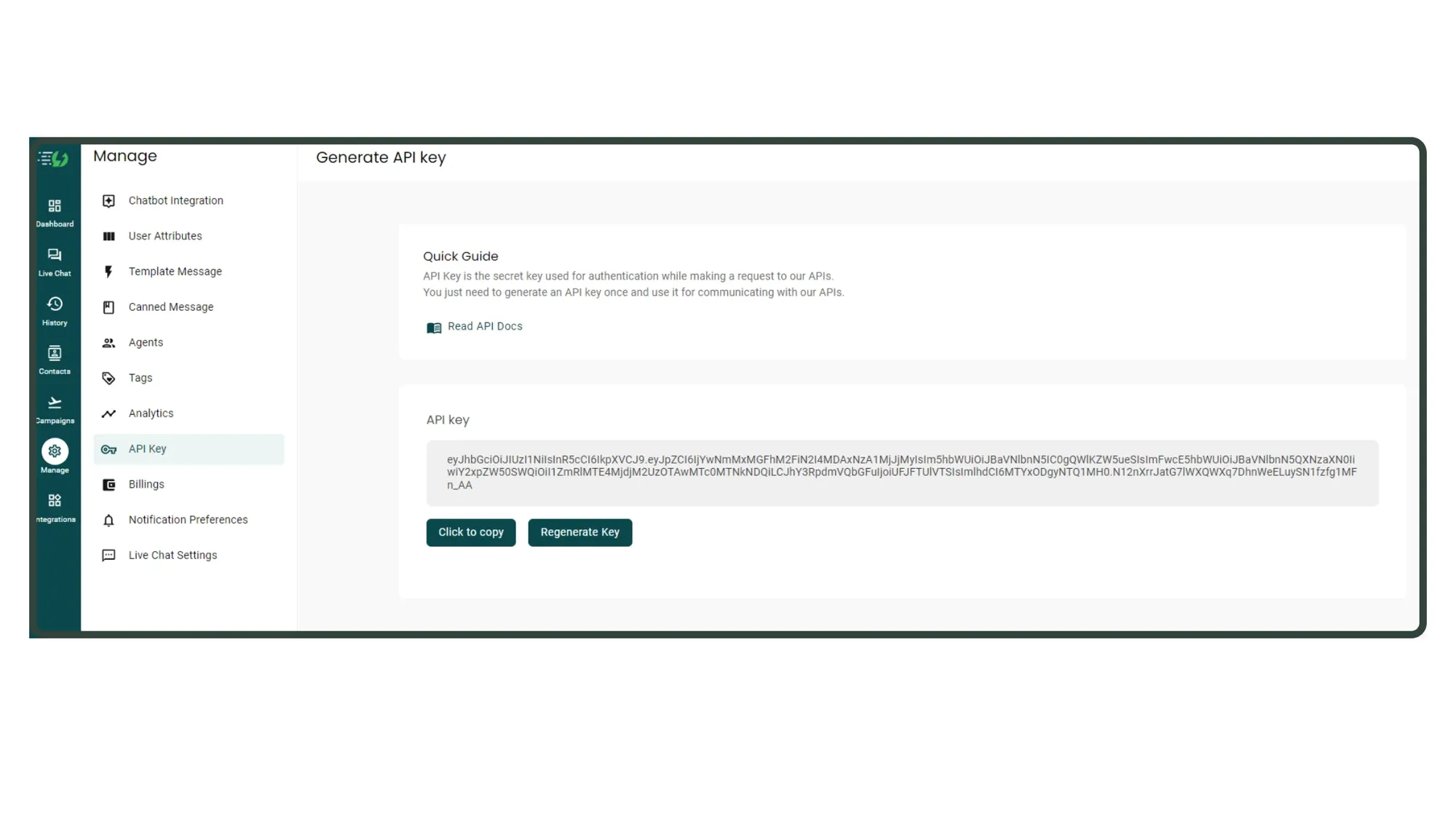
Copy Messegy API Key

Now, let's connect the API Key of Messegy to connect Calendly & Messegy. Go to Messegy App 👉 Manage 👉 API Key 👉 Copy API Key
9.Copy Messegy API Key.webp

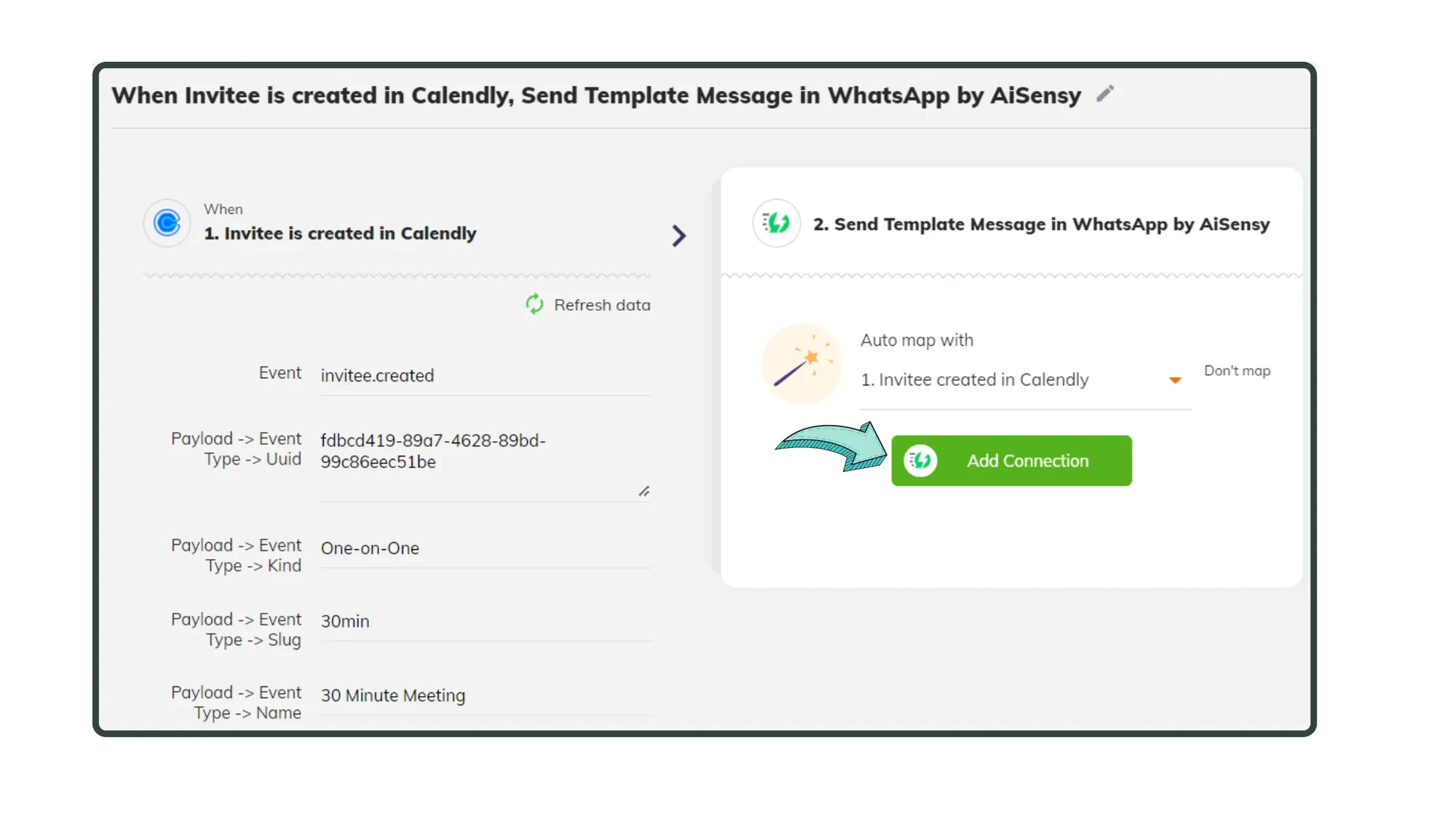
Paste Messegy API Key in Integrately

Paste the Messegy API Key by clicking "Add Connection" in Integrately.
10. paste Messegy API Key.webp

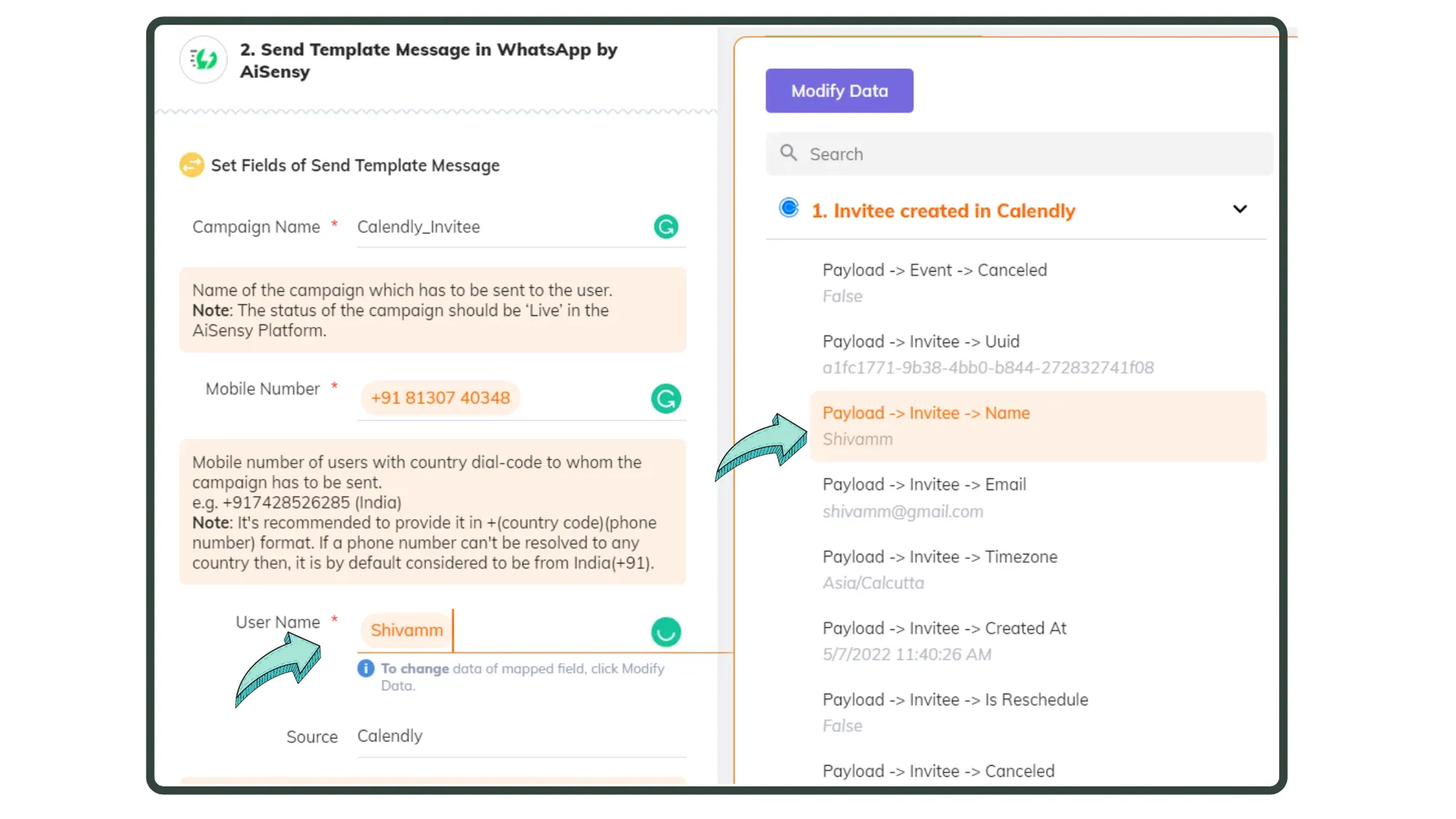
Map Attributes

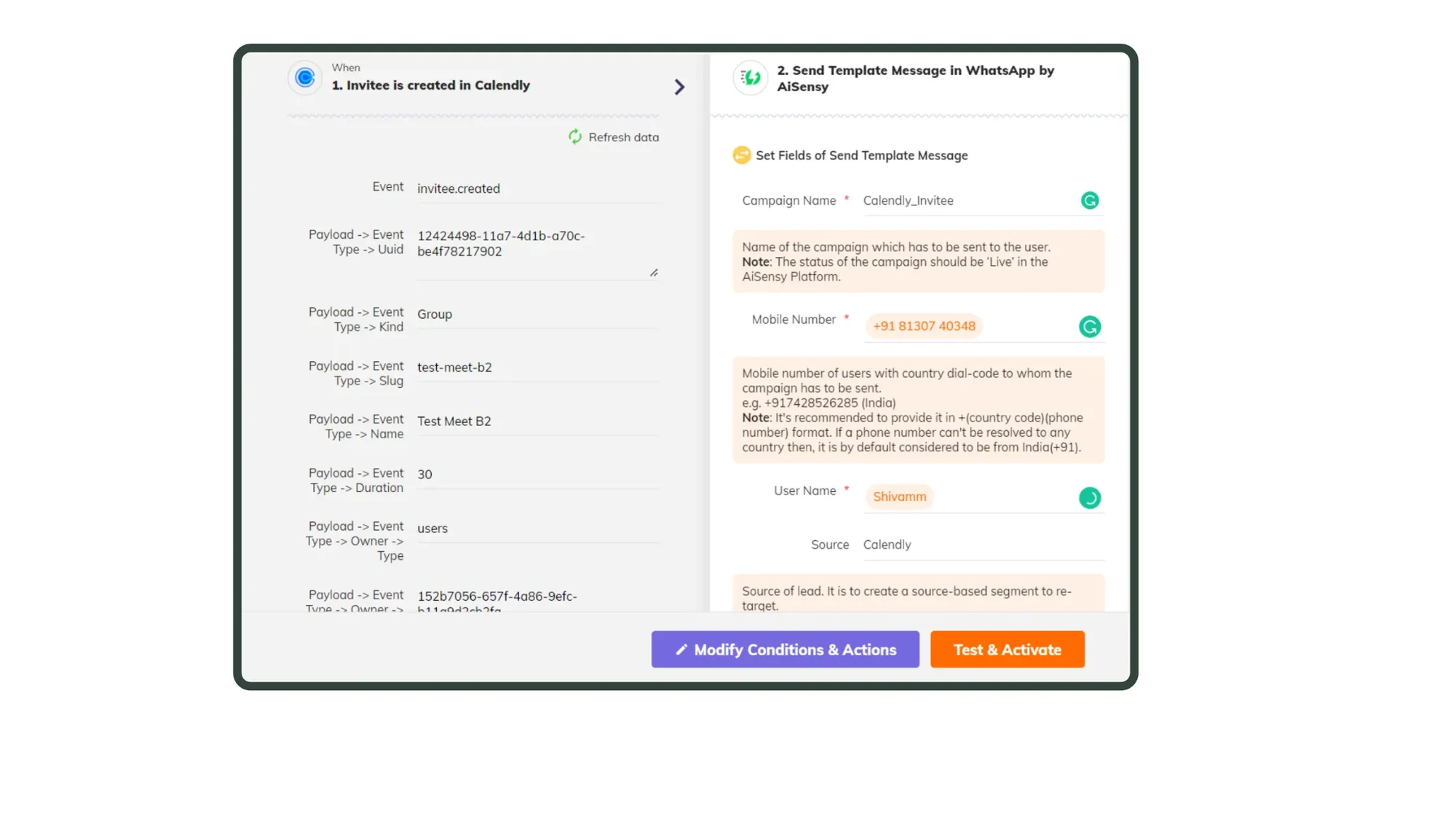
Map user data from Calendly to Messegy. This includes details like name, mobile number, and country code.Here, add your Campaign name exactly as it shows on Messegy Campaign Page. Note: If you haven't yet set an Active Campaign live in Messegy, do it! This step is compulsory for the integration to work!

How to set API Campaigns in Messegy
11. Map Attributes (2).webp

Add Tags & Attributes

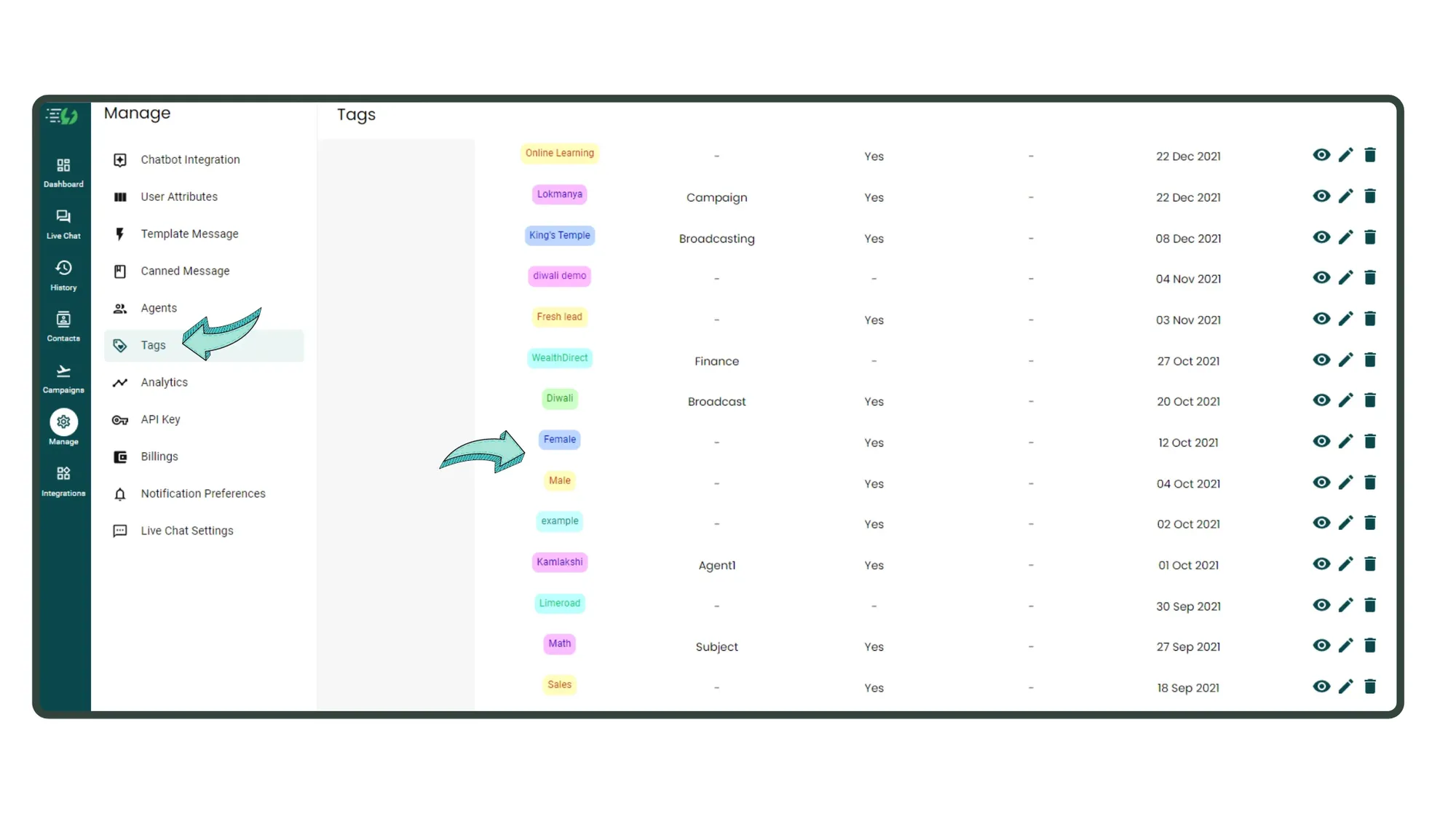
Add tags and attributes in Messegy to better organize your leads. In this example, we segregate based on gender.These tags will appear in the user's profile in Messegy.

How to Create Tags and Attributes in Messegy
12. Add tags & attributes.webp

Test & Activate Automation

Once you've mapped all data, verify & hit "Test & Activate" to activate your automation.
13. Test & Activate automation.webp

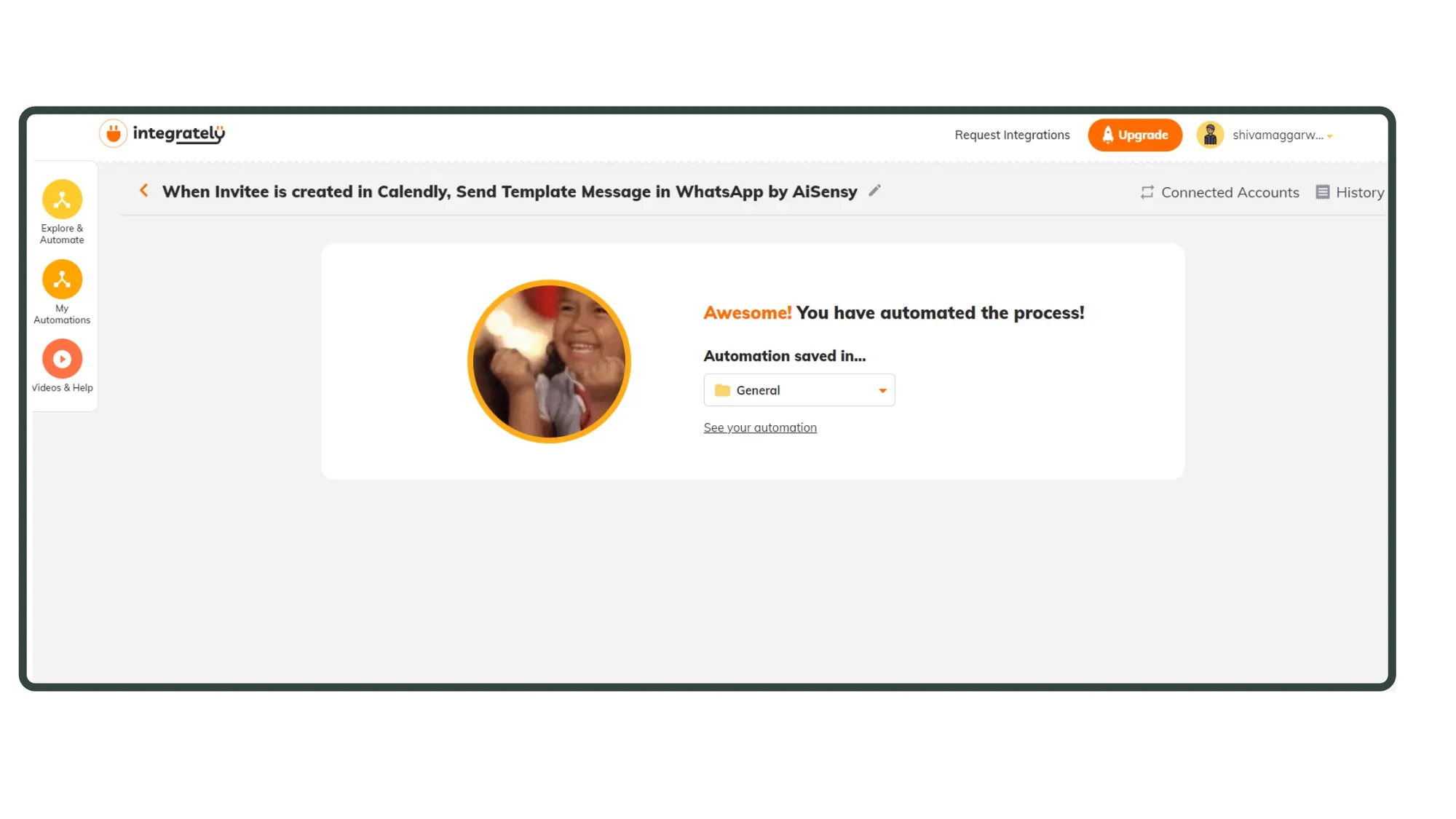
Automation Activated Successfully🎉

If all steps were performed correctly, you'll see the screen shown in the image.This means your automation is successfully activated. Whenever a user schedules a meeting, they will receive an automated notification with their name & time of the meeting.
14. Automation Success.webp

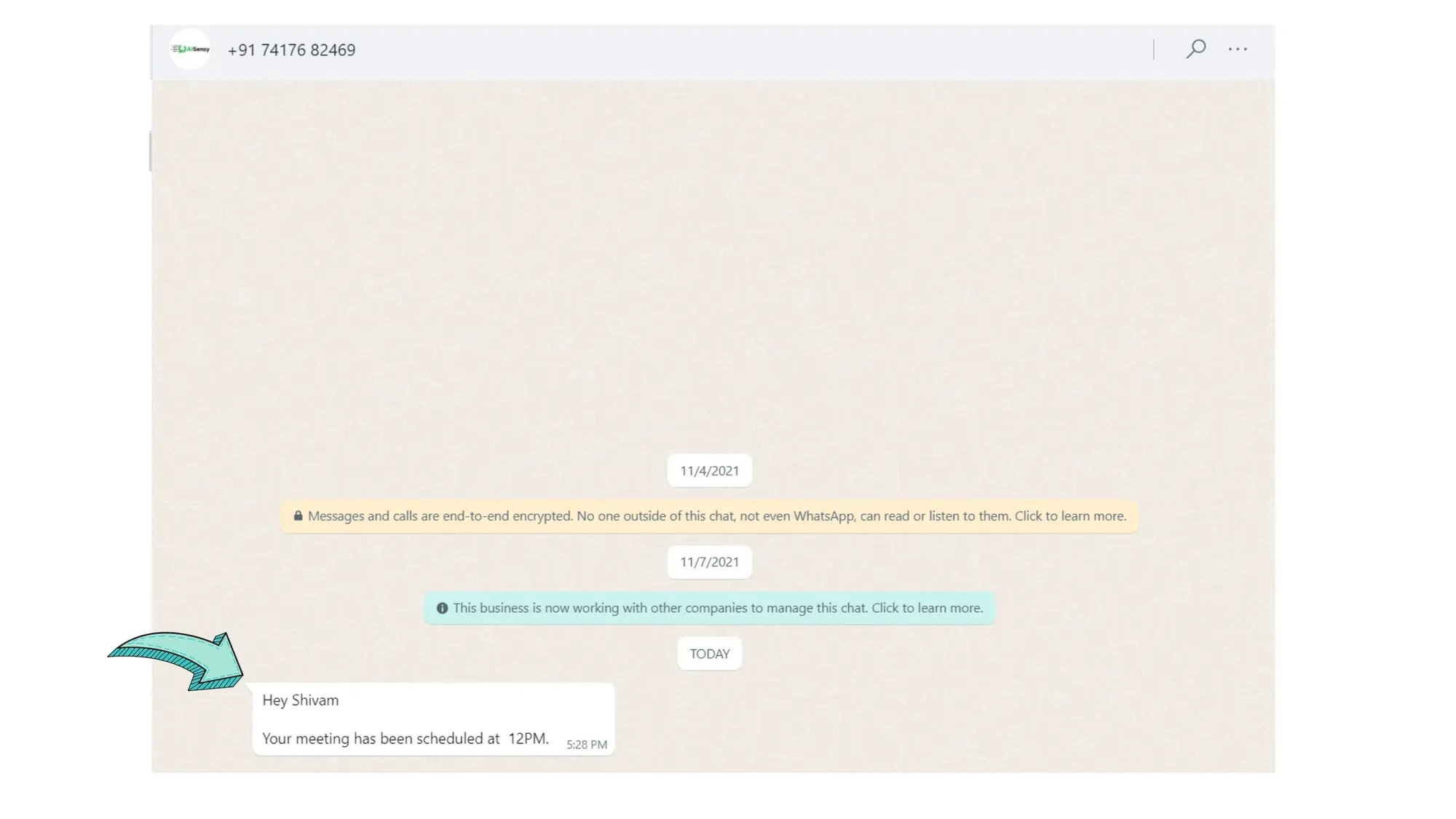
Message received

Here, you can see that upon scheduling a meeting, a message was automated instantly on WhatsApp. Here's a look at how the lead would appear in Messegy App
15. Message received.webp

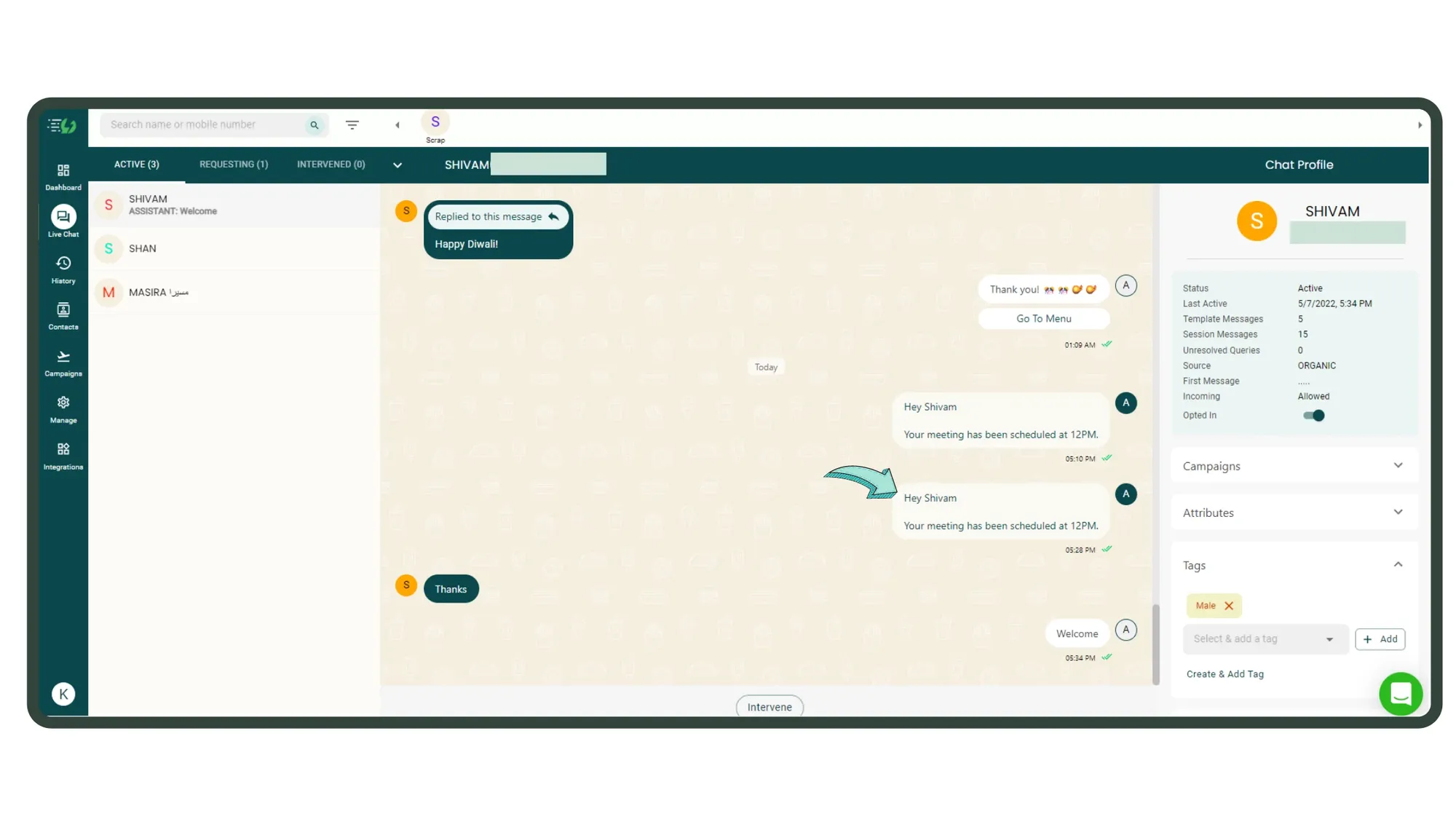
How the lead appears in Messegy App

Automated messages do not appear in Live Chat until the user replies. In this case, the user replied with a "Thanks".Here, you can see that in Tags, the user has been assigned a "Male Tag". Similarly, if it's a female, then the 'female' tag would be assigned.
16. How message appears in Messegy.webp

Magic Done! 🎉

That's it. Now, go on & connect Integrately with WhatsApp Business API based platform Messegy to connect multiple apps & automate API Campaigns.

Drive 3x Revenue with Messegy

Get Started for FREE. No Credit Card needed.⚡️Powered by Official WhatsApp Business API

Start for FREEBook a Demo